Workforce management
Workforce management
HR asks how many engineering seats are budgeted, recruiting asks how many are still open, and IT asks who actually holds the laptop assigned to seat number four. Three teams, three spreadsheets, three different answers. Workforce Management replaces all three with a single people-first model in Assets.
Workforce Management is a spoke service model built around the Core schema's master data. People, departments, and locations live once, in Core; this service model adds the workforce layer on top: the roles your organisation recruits against, who holds each role and since when, plus skills, certifications, equipment, and access grants per person. Deployed standalone, it creates its own people foundation locally and becomes a sanctioned alternate people-hub for HR teams.
What you get
| Object Type | Purpose | Key Attributes |
|---|---|---|
| Role | Positions your organisation defines and recruits against | Role Title, Department, Level, Salary Band, Total Positions, Open Positions |
| Role Assignment | Junction linking a person to a role they hold, with dates | Person, Role, Start Date, End Date, Status, Primary |
| Skill | Catalogue of competencies and skills | Skill Name, Category, Status |
| Certification | Professional certifications with validity periods | Certification Name, Issuer, Validity Period, Renewal Required |
| Employee Skill | Skills possessed by people, with proficiency | Person, Skill, Proficiency Level, Verified Date |
| Employee Certification | Certifications held by people, with expiry dates | Person, Certification, Issue/Expiry Date, Certificate Number |
| IT Asset | Equipment assigned to people | Asset Type, Asset Tag, Make, Model, Serial Number, Assigned To |
| Software Access | System and application access grants | Person, Application, Access Level, Granted By |
| Emergency Contact | Emergency contact information for people | Contact Name, Person, Relationship, Phone |
9 object types · 7 reference types
There is deliberately no Employee, Department, or Location type in this schema. Person, Department, and Application are Core schema types referenced directly from here, and work locations live on the Core Person record itself. Contractors are not a separate type either: a contractor is a Core Person with Employment Type set to Contractor and an End Date.
Pro tip: If Core is already installed, deploy Workforce Management on top and link its person references to your existing Core data. You get the workforce layer without duplicating a single person record.
Where the people data lives
Workforce Management extends the Core schema. At deploy time, each external reference (Person, Department, Application) is resolved one of three ways:
-
Link to Core (recommended when Core is installed): role assignments, skills, equipment, and access grants all point at the same Person objects the rest of your CMDB uses. One person, one record, every schema.
-
Create here (standalone deployment): LaunchPad creates the referenced types inside this schema from the bundled Core definitions. The result is a self-contained HR people foundation, and because the locally created Person type is the same canonical shape Core uses, it lines up cleanly with an HR or Entra sync from day one.
-
Keep as text: keep a reference as free text if you genuinely do not want the linked type.
This is what makes Workforce Management a Foundation service model alongside Core: deployed standalone it is the sanctioned alternate people-hub, and deployed alongside Core it is the workforce layer on the shared hub.
Roles, assignments, and headcount
The service model separates three ideas that spreadsheets usually blur together:
-
A Role is a position your organisation defines and recruits against, with a level, salary band, and headcount. It exists whether or not anyone currently holds it.
-
A Role Assignment records that a specific person holds a specific role, from a start date to an optional end date. People can hold several roles at once, and ended assignments preserve role history.
-
A person's Job Title is not in this service model at all. It lives on Core Person, as recorded by HR. "Senior Software Engineer, Mobile" is a job title; "Senior Software Engineer" with six budgeted seats is a Role.
Headcount works as a triangle. Role.Total Positions is the budgeted seats. Role.Open Positions is the vacancies being recruited. Filled seats are the count of Active Role Assignments for the role, found with a query rather than stored on the Role.
Looking for a Filled field? There is none, deliberately. Assets has no calculated fields, so a stored Filled number would drift out of date the moment an assignment changed. Count Active Role Assignments with AQL or a dashboard instead. The quick start guide covers the queries.
When to use this service model
Deploy Workforce Management if your organisation needs to:
-
Track budgeted, open, and filled positions per role without a recruiting spreadsheet
-
Record who holds which role, including multiple roles per person and full role history
-
Automate joiner-mover-leaver processes, so onboarding triggers provisioning and offboarding triggers recovery
-
Know which people have access to which applications, at what level, and who approved it
-
Maintain a skills and certification inventory with proficiency levels and expiry alerting
-
Stand up a canonical people foundation for HR, with or without the rest of a CMDB
It is particularly valuable for organisations of 100 or more people, and for any team facing SOC 2 or ISO 27001 audits where demonstrating access control matters.
Not quite right? If you only need IT infrastructure tracking without the people layer, look at Standard CMDB or Core Schema. For security-focused asset tracking with vulnerability management, try Cybersecurity. For licence compliance and software lifecycle tracking, Software Asset Management is the better fit.
Schema at a glance
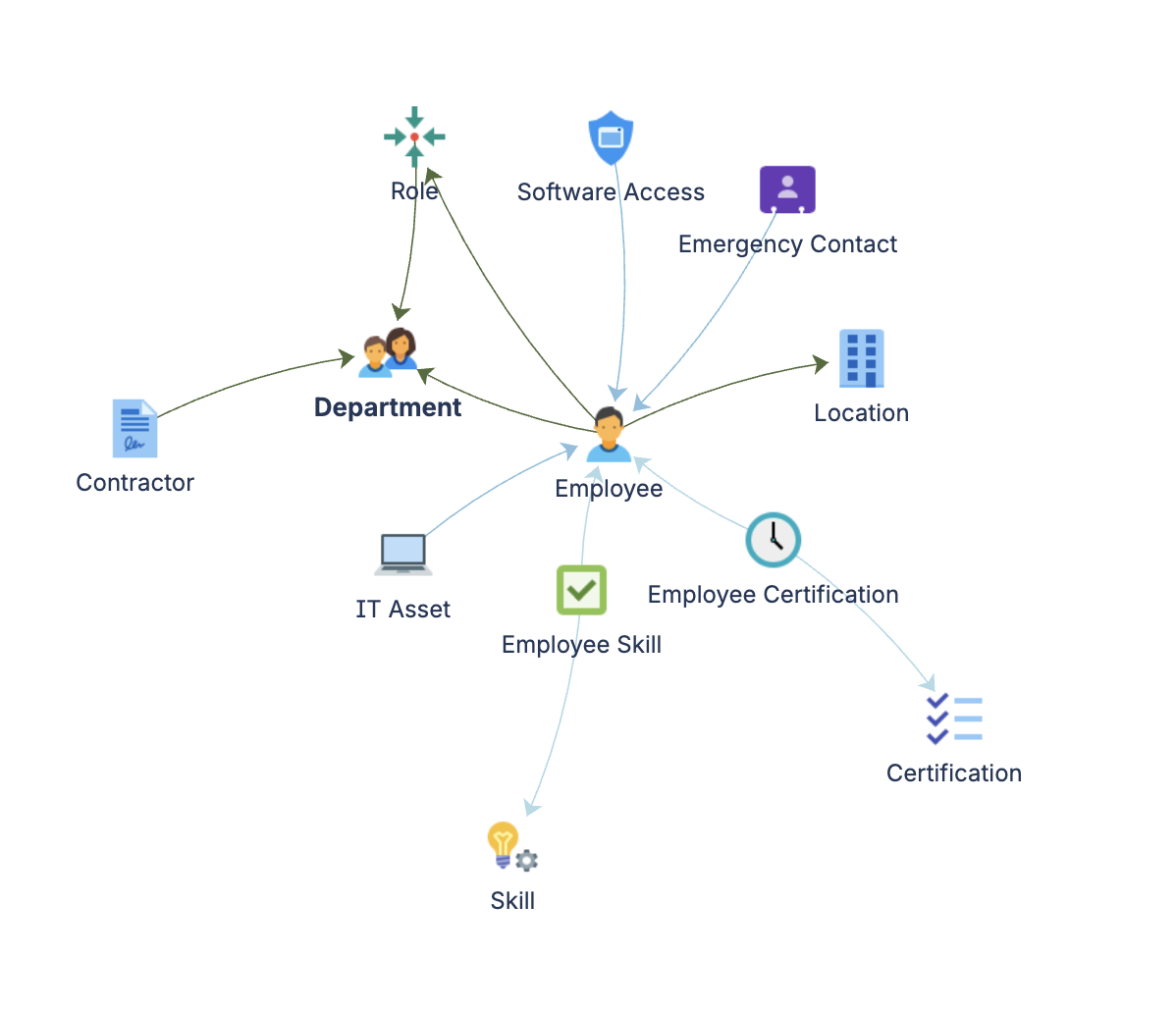
Master data (Core schema, or created locally)
  Person · Department · Application

Positions and headcount
  Role ──(Works In)──▶ Department
  Role Assignment ──(Holds Role)──▶ Person + Role

Competency catalogues
  Skill · Certification

Per-person records
  Employee Skill ──(Has Skill)──▶ Person + Skill
  Employee Certification ──(Certified In)──▶ Person + Certification
  IT Asset ──(Assigned To)──▶ Person
  Software Access ──(Assigned To)──▶ Person
                  ──(Grants Access To)──▶ Application
                  ──(Granted By)──▶ Person
  Emergency Contact ──(Assigned To)──▶ Person
Documentation
Quick Start Guide Deployment walkthrough covering the role and headcount model, role assignments, skills and certification tracking, and asset and access management. Includes attribute references for all nine object types.
Governance Playbook (part of LaunchPad IP) Workforce data review cadence, certification expiry management, access review practices, and role assignment lifecycle governance.
Forms Specification (part of LaunchPad IP) Form layouts for the workforce management object types, including onboarding, offboarding, and access request forms.