Cybersecurity
Cybersecurity
An auditor asks who owns the server behind a critical finding, and the honest answer is a name typed into a spreadsheet eight months ago. Nobody knows if that person still works here. The Cybersecurity service model replaces that guesswork with real links: every owner, team, location, application, and vendor on a security record points at a live object in your Core Schema, so the answer is always current.
Cybersecurity is a spoke service model. It models the security layer of your CMDB (assets, vulnerabilities, controls, risks, and compliance requirements) while pulling its organisational master data from Core. Patch a server and the vulnerability record closes against the same asset your scanner found. Hire a new control owner and every control they inherit updates in one place.
What you get
| Object Type | Purpose | Key Attributes |
|---|---|---|
| Security Asset | Devices and infrastructure under security management | Name, Type, Environment, Criticality, Data Classification, Owner, Status |
| Vulnerability | Scanner findings tracked through remediation | CVE ID, Severity, CVSS Score, Affected Asset, Remediation Status, Assigned To |
| Risk | Risk register entries with likelihood and impact scoring | Category, Likelihood, Impact, Risk Score, Treatment, Owner |
| Security Control | Safeguards mapped to compliance frameworks | Control ID, Framework, Category, Implementation Status, Owner |
| Compliance Requirement | Regulatory and policy obligations | Requirement ID, Framework, Compliance Status, Mapped Controls, Owner |
5 object types · 18 reference types · extends Core Schema
Built on Core Schema
Cybersecurity v1.1 declares extends: CORE. Ten attributes across the five object types are genuine object references into Core Schema rather than free-text fields:
| Attribute | Points at (Core) | Reference type |
|---|---|---|
| Security Asset · Owner | Person | Owned By |
| Security Asset · Owning Team | Team | Managed By |
| Security Asset · Location | Location | Located At |
| Security Asset · Application | Application | Supports |
| Security Asset · Vendor | Vendor | Provided By |
| Vulnerability · Assigned To | Person | Remediation Assignee |
| Risk · Owner (required) | Person | Risk Owner |
| Security Control · Owner | Person | Control Owner |
| Security Control · Owning Team | Team | Control Team |
| Compliance Requirement · Owner | Person | Compliance Owner |
When you deploy, LaunchPad asks how each of these references should resolve:
- Link to Core: connect to the matching object type in your installed Core Schema. The recommended choice whenever Core is deployed; ownership stays in one place.
- Create here: LaunchPad creates a copy of the target object type inside this schema from the bundled Core definition. A standalone fallback when Core is not installed.
- Keep as text: the attribute becomes a free-text field with no object link.
You choose once per reference at deploy time, and cross-schema sharing is configured for you automatically. The quick start guide covers the trade-offs in detail.
The reference mode is settled at deploy, but the service model itself is not frozen there. Object types and reference types stay editable after deployment, and Expand a Service Model adds new types from the service model library through the create-only Merge engine, which only ever adds and never changes or removes what is already in place. So you can deploy the five object types now and grow the model as your security programme matures. See Expanding an installed service model.
Pro tip: Deploy Core Schema first and choose Link to Core for every reference. Linked records mean a terminated employee, a decommissioned site, or a renamed application is corrected once in Core and reflected instantly across your entire security inventory.
When to use this service model
Deploy Cybersecurity when your organisation needs to:
-
Track scanner findings against named assets with clear remediation ownership and SLA deadlines
-
Run a formal risk register that scores likelihood and impact against real infrastructure instead of a standalone spreadsheet
-
Map security controls to frameworks such as CIS Controls, NIST CSF, ISO 27001, SOC 2, PCI-DSS, and HIPAA
-
Prove to auditors which requirements are covered, by which controls, with evidence links attached
It suits organisations preparing for certification, those juggling more than one compliance framework, and any security function that needs CMDB-grade traceability behind its reporting.
Not quite right? For general infrastructure inventory without the security depth, look at Standard CMDB. For identity and access questions (who holds which role), Workforce Management is the better fit.
Schema at a glance
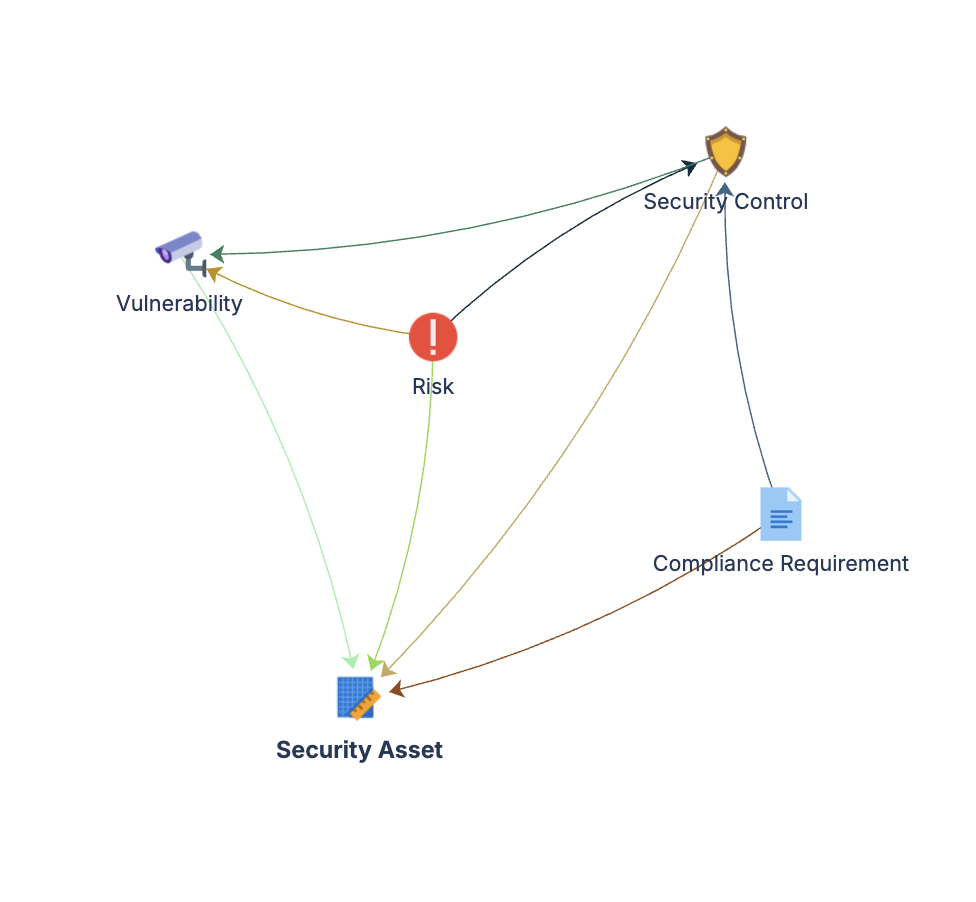
Core Schema (Person, Team, Location, Application, Vendor)
        ▲
        │  Link / Create here / Keep as text (chosen at deploy)
        │
Security Asset ◀──(Affects)────── Vulnerability
Security Asset ◀──(Protects)───── Security Control
Security Asset ◀──(Impacts)────── Risk
Security Asset ◀──(Applies To)─── Compliance Requirement
Security Control ◀──(Satisfied By)── Compliance Requirement
Risk ──(Mitigated By)──▶ Security Control
Risk ──(Triggered By)──▶ Vulnerability
Five object types in the schema, five more reachable in Core. One query answers the audit question: which assets are exposed, who owns them, which controls apply, and are we compliant.
Atlassian's schema graph view does not draw cross-schema edges, so linked Core references will not appear as lines in the diagram inside Assets. The references work; the graph simply cannot render them. This is a platform limitation, not a deployment fault.
Documentation
Quick Start Guide Full deployment walkthrough for all five object types, including how to resolve the ten Core references, populate first records, and connect vulnerability scanners.
Governance Playbook (part of LaunchPad IP) Review cadences, vulnerability lifecycle ownership, risk register hygiene, and compliance assessment scheduling.
Forms Specification (part of LaunchPad IP) Form layouts for security assets, vulnerabilities, controls, risks, and compliance requirements.