Enterprise IT CMDB
Enterprise IT CMDB
The board asks a simple question: "if we lose the payment processing cluster, what stops working?" Eighteen months of CMDB effort, thousands of server and application records, and still nobody can trace the chain from a rack in a data centre up to a business capability. The Enterprise IT CMDB exists to make that question answerable in minutes.
Version 2.0 brings the schema into LaunchPad's hub-and-spoke architecture. It extends the Core Schema, so people, teams, vendors, cost centres, locations, and portfolio applications live once in Core and every owner, supplier, and location field here links to them. Twenty object types across three tiers: Business (capabilities, services, contracts, licences), Application (applications, microservices, container images, APIs, databases), and Infrastructure (cloud accounts, clusters, servers, VMs, cloud instances, load balancers, network devices, certificates, DNS, backups). Everything is wired together so a failing server traces all the way up to the business service that depends on it, with a named owner at every link in the chain.
What you get
Business tier
| Object Type | Purpose | Key Attributes |
|---|---|---|
| Business Capability | High-level business functions | Capability Name, Owner (Core Person), Criticality, Strategic Value |
| Business Service | Customer-facing business services | Service Name, Service Owner (Core Person), SLA, RPO, RTO, Criticality |
| Technical Service | IT services supporting business services | Service Name, Service Type, Owner (Core Person), Support Team (Core Team), Tier |
| Contract | Vendor contracts | Vendor (Core Vendor), Contract Type, Start/End Date, Value, Auto-Renew |
| Software License | Software licences and entitlements | Product, License Type, Quantity, Vendor (Core Vendor), Annual Cost, Expiry Date |
Application tier
| Object Type | Purpose | Key Attributes |
|---|---|---|
| Application | Business applications | Application Name, Version, Tech Stack, SDLC Phase, Risk Rating, Owner (Core Person), Portfolio Entry (Core Application) |
| Microservice | Service components and microservices | Service Name, Repository, API Endpoint, Owner (Core Team), Health Check URL |
| Container Image | Docker and container images | Image Name, Registry, Version/Tag, Base Image, Scan Status |
| API | Internal and external APIs | API Name, Endpoint, Version, Auth Type, Rate Limits |
| Database | Database instances | Database Name, Database Type, Version, Replication, Backup Status, Encryption |
Infrastructure tier
| Object Type | Purpose | Key Attributes |
|---|---|---|
| Cloud Account | AWS, Azure, GCP accounts | Account Name, Account ID, Provider, Owner (Core Team), Cost Center (Core), Monthly Budget |
| Kubernetes Cluster | K8s clusters | Cluster Name, Provider, Version, Node Count, Environment, GitOps Repo |
| Server | Physical and virtual servers | Hostname, Location (Core Location), IP Address, Server Type, OS, CPU Cores, RAM |
| Virtual Machine | VMs specifically | VM Name, Host Server, Hypervisor, vCPU, vRAM, Snapshots |
| Cloud Instance | Cloud VMs and instances | Instance Name, Instance ID, Instance Type, Region, Monthly Cost |
| Load Balancer | Traffic distribution and load balancers | LB Name, LB Type, VIPs, Health Check URL, SSL Termination |
| Network Device | Routers, switches, firewalls | Device Name, Location (Core Location), Device Type, Manufacturer, Firmware |
| Certificate | SSL/TLS certificates | Domain, Issuer, Expiry Date, Key Size, Auto-Renew |
| DNS Record | DNS entries | FQDN, Record Type, Value, TTL, Provider |
| Backup Job | Backup configurations | Source System, Schedule, Retention, Last Run Status, Success Rate |
20 object types · 10 reference types
The reference types split into structural relationships within the schema (Delivered By, Depends On, Runs On, Managed By, Located In) and cross-schema relationships into Core (Owned By, Supported By, Supplied By, Funded By, Instance Of).
Pro tip: Deploy Core first, then deploy this schema in tier order: Business, then Application, then Infrastructure. With Core in place, every owner and vendor field resolves to a shared master record, and infrastructure records always have a service to link back to. That is what makes the CMDB useful rather than just a device list.
What changed in v2.0
If you documented or deployed an earlier version, three things are different:
-
The schema extends Core. Owner fields on Business Capability, Business Service, Technical Service, and Application link to Core Person. Microservice and Cloud Account owners link to Core Team. Technical Service support links to Core Team. Software License and Contract vendors link to Core Vendor. Cloud Account funding links to Core Cost Center.
-
The local Location type is gone (21 types down to 20). Core's Location carries everything the local type held, including Tier Rating, Compliance Certs, and a widened Type list with data centre, colocation, edge site, and disaster recovery values. Server and Network Device link straight to Core Location.
-
Application gained an optional Portfolio Entry reference to the Core Application type, recording which portfolio-level application a deployed instance realises. The circular inverse link from Contract back to Software License was removed; the relationship is held once, on Software License.
When to use this schema
Deploy Enterprise IT CMDB if your organisation:
-
Manages complex, multi-site infrastructure with hundreds of servers across physical and cloud environments
-
Needs to trace the full dependency chain from business capability down to physical hardware
-
Has a mature IT function with dedicated teams for infrastructure, applications, and security
-
Requires evidence of configuration management for audit or compliance (ISO 27001, ITIL, SOX)
-
Is migrating from an existing CMDB tool (ServiceNow, Remedy) and needs a comprehensive target schema
This is the most complex schema in LaunchPad. If you are just getting started with CMDB, deploy the Standard CMDB first. You can always migrate to Enterprise IT as your practice matures.
Not quite right? If your infrastructure is primarily cloud-native (no physical data centres), look at Cloud-Native Infrastructure. If you need security-specific tracking (vulnerabilities, controls, compliance), layer on Cybersecurity.
Schema at a glance
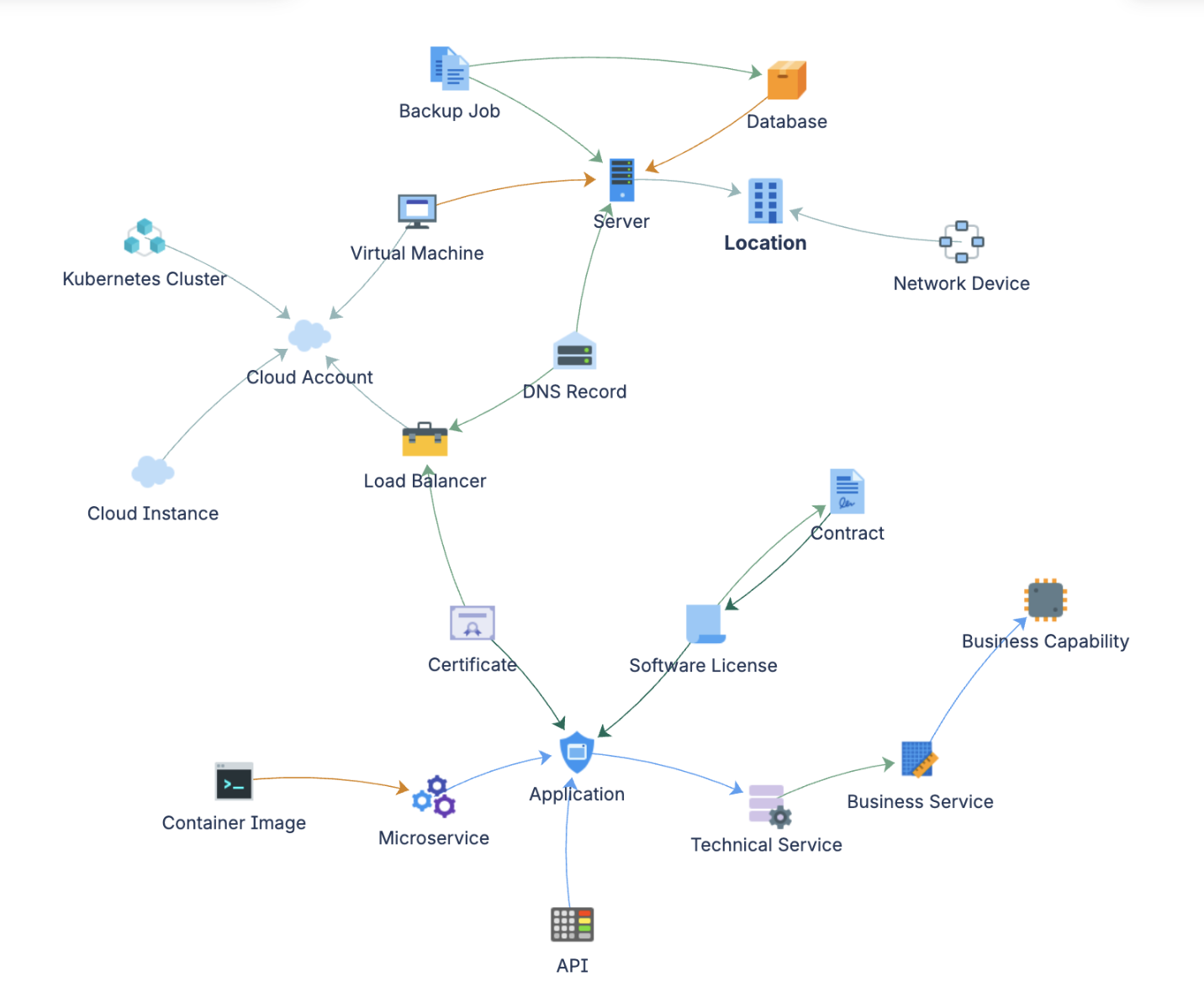
Business tier
  Business Service ──(Delivered By)──▶ Business Capability
  Technical Service ──(Depends On)──▶ Business Service
  Software License ──(Managed By)──▶ Application
  Software License ──(Depends On)──▶ Contract
  Software License ──(Supplied By)──▶ Vendor [Core]
  Contract ──(Supplied By)──▶ Vendor [Core]

Application tier
  Application ──(Delivered By)──▶ Technical Service
  Application ──(Instance Of)──▶ Application [Core]
  Microservice ──(Delivered By)──▶ Application
  Container Image ──(Runs On)──▶ Microservice
  API ──(Delivered By)──▶ Application
  Database ──(Runs On)──▶ Server

Infrastructure tier
  Server ──(Located In)──▶ Location [Core]
  Network Device ──(Located In)──▶ Location [Core]
  Virtual Machine ──(Runs On)──▶ Server
  Virtual Machine ──(Located In)──▶ Cloud Account
  Cloud Instance ──(Located In)──▶ Cloud Account
  Kubernetes Cluster ──(Located In)──▶ Cloud Account
  Load Balancer ──(Located In)──▶ Cloud Account
  Certificate ──(Managed By)──▶ Application
  Certificate ──(Depends On)──▶ Load Balancer
  DNS Record ──(Depends On)──▶ Load Balancer / Server
  Backup Job ──(Depends On)──▶ Database / Server

Ownership and funding (all into Core)
  Business Capability / Business Service /
  Technical Service / Application ──(Owned By)──▶ Person [Core]
  Microservice / Cloud Account ──(Owned By)──▶ Team [Core]
  Technical Service ──(Supported By)──▶ Team [Core]
  Cloud Account ──(Funded By)──▶ Cost Center [Core]
Documentation
Quick Start Guide Phased deployment guide for all 20 object types, structured by tier. Covers priority ordering, the Core dependency, and verification at each phase.
Governance Playbook (part of LaunchPad IP) Enterprise governance practices: federated data stewardship, ownership model across teams, review cadence by tier, and data quality KPIs.
Forms Specification (part of LaunchPad IP) Form layouts for all 20 object types across the Business, Application, and Infrastructure tiers.