Cloud-native infrastructure
Cloud-native infrastructure
Ask your cloud console who owns the account that ran up last month's bill and it will show you a twelve digit number. Ask which team is responsible for the namespace that keeps tripping its memory quota and it will show you a label, if someone remembered to apply one. The consoles know what exists; they rarely know who is accountable for it or which budget pays for it.
Cloud-Native Infrastructure (v1.1) closes that gap. It models your cloud estate from the account level down: Kubernetes clusters and the namespaces inside them, the deployments running there, plus the registries, functions, databases, buckets, CDN distributions, and service meshes around them. It is a spoke schema that extends Core Schema, so ownership and funding are not free-text fields: cloud accounts and namespaces point at real Team and Cost Center objects in your shared Core hub.
What you get
| Object Type | Purpose | Key Attributes |
|---|---|---|
| Cloud Account | AWS, Azure, or GCP accounts and subscriptions | Account ID, Provider, Owner (Team), Cost Center, Monthly Spend, Environment |
| Kubernetes Cluster | EKS, AKS, GKE, and self-managed clusters | Provider, Version, Node Count, Region, GitOps Repo, Cloud Account |
| Namespace | Workload isolation boundaries within clusters | Cluster, Team Owner, CPU Quota, Memory Quota, Purpose |
| Deployment | Kubernetes deployments and workloads | Namespace, Image, Replicas, CPU Limit, Memory Limit, Registry |
| Container Registry | Image registries (ECR, ACR, GCR, Docker Hub) | Provider, URL, Scan Policy, Cloud Account |
| Serverless Function | Lambda, Cloud Functions, Azure Functions | Runtime, Memory (MB), Timeout (sec), Trigger Type |
| Managed Database | RDS, Cloud SQL, Cosmos DB and similar services | Engine, Version, Instance Type, Multi-AZ, Storage (GB) |
| Object Storage | S3, GCS, and Azure Blob buckets | Provider, Region, Versioning, Encryption, Public Access |
| CDN Distribution | CloudFront, CloudFlare, Azure CDN, Fastly | Provider, Domain, Origin, SSL Certificate, Cache Policy |
| Service Mesh | Istio, Linkerd, Consul Connect | Type, Version, mTLS Status, Cluster |
10 object types · 5 reference types · extends Core Schema
Hub and spoke: Core Schema is the master-data hub; Cloud-Native Infrastructure is a spoke deployed on top of it. Deploy Core first and your cloud records link to the same Team and Cost Center objects every other spoke uses. Rename a team once in Core and every account and namespace it owns reflects the change.
When to use this schema
Cloud-Native Infrastructure is the right choice when your organisation:
-
Operates across one or more public cloud providers and needs a single inventory of accounts, clusters, and managed services
-
Runs Kubernetes and wants namespaces, deployments, and mesh configuration tracked with clear team ownership
-
Practises FinOps and needs spend attributed to teams and cost centres, not just to account numbers
-
Wants governance over cluster versions, registry scan policies, public bucket access, and mTLS posture
-
Manages three or more cloud accounts, or two or more clusters, and has outgrown spreadsheets
Not quite right? For on-premises estates (physical servers, network hardware, data centres), start with Standard CMDB or Enterprise IT CMDB. For application and service tracking without cloud resource depth, Core Schema is enough on its own. For licence compliance rather than infrastructure, see Software Asset Management.
Schema at a glance
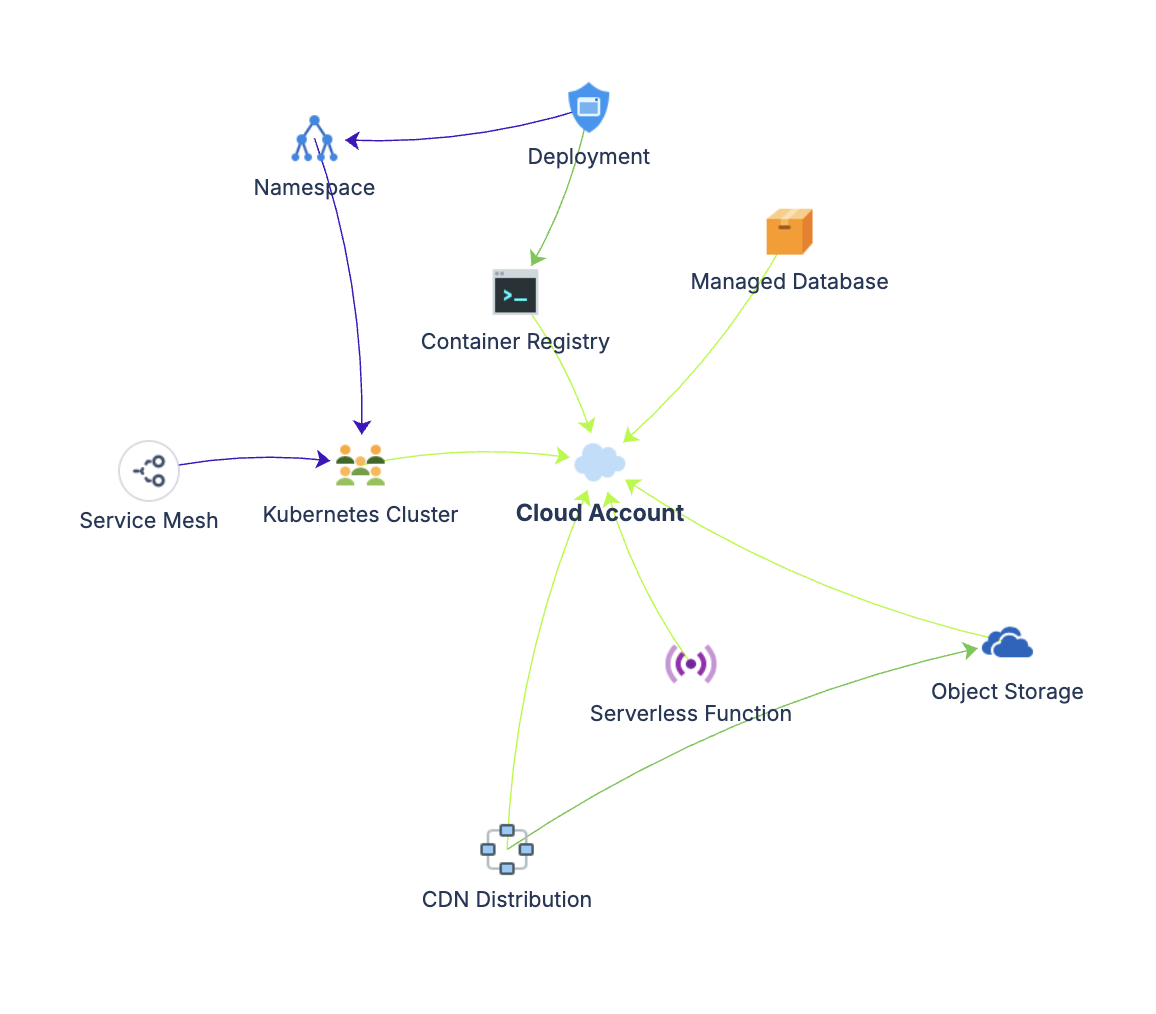
Core Schema (hub)                       Cloud-Native Infrastructure (spoke)

Team ◀──────────(Owned By)────────────  Cloud Account
Cost Center ◀───(Funded By)───────────  Cloud Account
Team ◀──────────(Owned By)────────────  Namespace

Cloud Account
├── Kubernetes Cluster ───(Belongs To)──▶ Cloud Account
│   ├── Namespace ────────(Deployed In)─▶ Kubernetes Cluster
│   │   └── Deployment ───(Deployed In)─▶ Namespace
│   └── Service Mesh ─────(Deployed In)─▶ Kubernetes Cluster
├── Container Registry ───(Belongs To)──▶ Cloud Account
├── Serverless Function ──(Belongs To)──▶ Cloud Account
├── Managed Database ─────(Belongs To)──▶ Cloud Account
├── Object Storage ───────(Belongs To)──▶ Cloud Account
└── CDN Distribution ─────(Belongs To)──▶ Cloud Account

Deployment ───────────────(Uses)────────▶ Container Registry
CDN Distribution ─────────(Uses)────────▶ Object Storage
Five reference types carry these relationships: Belongs To (blue, resources roll up to accounts and clusters), Deployed In (green, where workloads run), Uses (purple, service dependencies), Owned By (blue, accountability to a Core Team), and Funded By (green, spend attribution to a Core Cost Center).
How Core references resolve at deploy time
Three attributes in this schema point outside it, into Core Schema: Cloud Account's Owner (Team) and Cost Center, and Namespace's Team Owner (Team). When you deploy Cloud-Native Infrastructure, LaunchPad asks how each of these external references should be handled:
-
Link to Core. Connect the attribute to your existing shared Core schema. Recommended whenever Core is installed; everything stays in one hub.
-
Create here. No Core schema yet? LaunchPad creates Team and Cost Center object types inside this schema from the bundled Core definitions, so the references still work standalone. This is one level deep with scalar attributes only.
-
Keep as text. Keep the attribute as a simple text field. You lose linked navigation and reference-based AQL, but nothing blocks deployment.
You choose per reference, so a team that has Core installed but is not ready to model cost centres can link Owner and keep Cost Center as text.
Documentation
Quick start guide Deployment walkthrough for all ten object types: dependency order, first records, Core reference resolution, and starter data for AWS, Azure, and GCP.
Governance playbook (part of LaunchPad IP) Lifecycle management for fast-moving cloud resources, FinOps review cadences, and ownership audit practices.
Forms specification (part of LaunchPad IP) Form layouts for accounts, clusters, namespaces, workloads, and managed services.