Show suggestions to customers
Show suggestions to customers
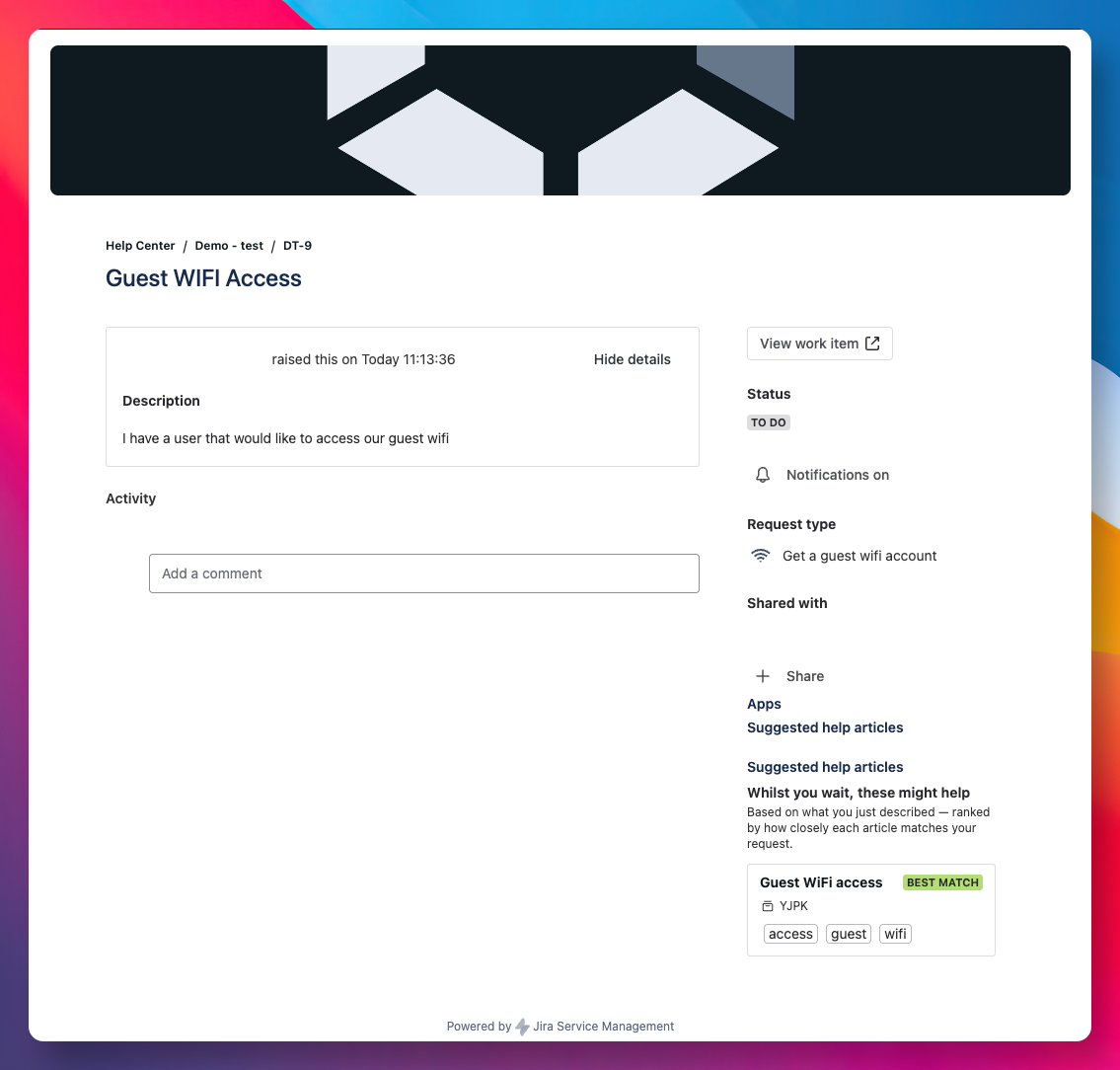
The panel helps your agents. This step gives customers the same second chance. When you switch it on, the same scored matches your agents see appear for the customer on their request, right after they submit it, while they are waiting for a reply.
It is read-only. Customers can open an article and may solve the issue themselves, but nothing here closes or changes their request. Closure stays with your team.
Turn it on
- In the project, go to Project settings → Apps → Second Chance.
- Find the Customer portal section.
- Switch Surface matching articles to customers on. This requires Second Chance to be enabled for the project, so turn that on first if you have not already.
- Save.
Choose how confidence shows
Under the same toggle you can choose how relevant each suggestion looks to the customer:
- Relevance bands (the default): every article shows Best match, Good match, or Related, colour coded. Nothing about the underlying score reaches the customer.
- Single badge: only the top article carries a Best match badge. The rest are unlabelled but still ranked.
- Percentage: strong articles show an "n% match". This number is a calibrated confidence from 0 to 99, not the raw match score your agents tune against, so a strong article reads high. The admin panel says so plainly, so nobody is left wondering why the figures differ.
- None: no labels at all. Articles are still ordered by relevance.
Pick whichever fits your portal. You can change it at any time.
What the customer sees
On their request, under a short heading, the customer sees up to three ranked articles with the cue you chose. Each title is a link. There is no resolve button and no close button, so a customer can read an article and self-resolve, or wait for an agent, with no risk of a ticket closing by accident.
What customers never see
Only articles that are published to the portal for that service desk are ever shown. A restricted or internal article does not appear in the portal, not even to the person who raised the request. The suggestions are scoped to the service desk the customer is already viewing, so one desk's knowledge never leaks into another's portal.
If the panel does not appear
- Confirm both switches are on: Second Chance for the project, and Surface matching articles to customers. Save again if in doubt.
- The panel only appears when there is a genuinely matching article. If the request has nothing strong behind it, the customer sees nothing, which is the right behaviour.
- A project where the toggle is off shows no customer panel at all.
Where to next
You are now surfacing knowledge to both sides of the desk. Step back and measure the whole picture: Read your coverage.