Feedback from agents and customers
Feedback from agents and customers
A suggestion is only worth showing if it actually helps. Second Chance asks both the agent working the request and the customer who raised it the same simple question, "Was this helpful?", and totals the answers for your admins. Over time this tells you which articles earn their place and which need rewriting or retiring.
Where feedback is gathered
On the agent panel. Under each suggested article on the request, an agent can mark it Useful or Not useful. This is collected only when you switch on Capture agent feedback in the project settings; it is off by default, so you opt in deliberately.
On the customer portal. Under each article a customer sees on their own request, there is a quiet thumbs up / thumbs down. This is collected automatically whenever you have the portal panel switched on; there is no separate toggle. The customer's answer is fire-and-forget: they get a short "Thanks for letting us know" and nothing about their request changes. End-user feedback is the signal that matters most, because it comes from the person the article was meant to help.
Either way, each person gets one rating per article per request. Changing your mind simply overwrites your previous answer, so a customer tapping twice never inflates the count.
Where it shows up
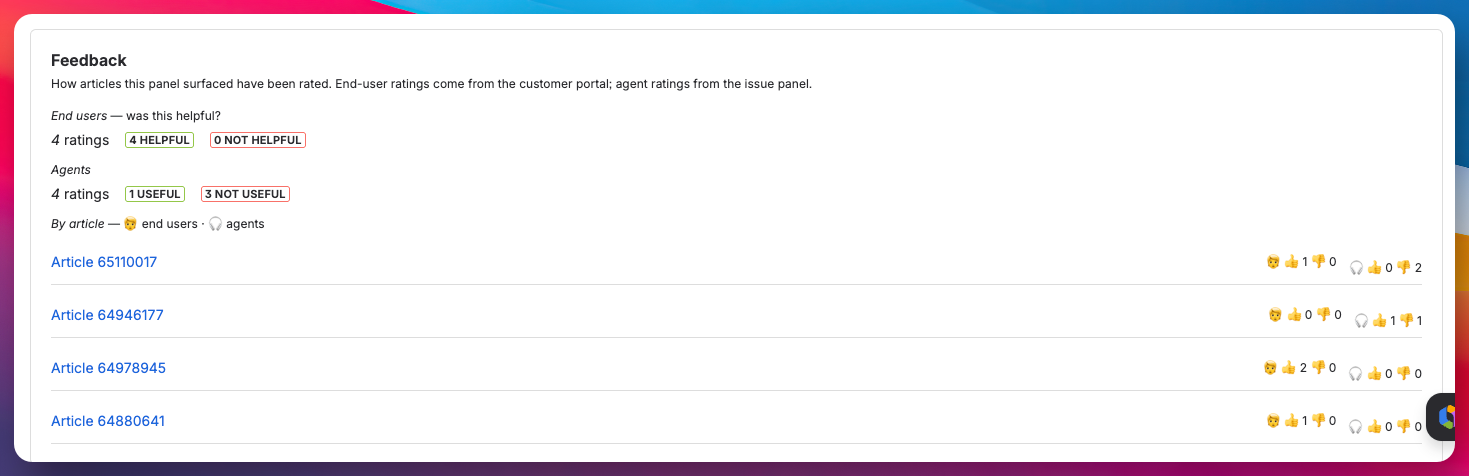
Open Project settings → Apps → Second Chance and find the Feedback section. It reads back every rating for the project and splits it in two:
- End users: the portal "was this helpful?" tally: total ratings, how many helpful, how many not.
- Agents: the same tally from the issue panel.
Below the split is a per-article breakdown, most-rated first, so you can see at a glance which specific articles are landing with each audience.
If you have not collected anything yet, the section says so plainly rather than showing an empty grid. If agent capture is off, it reminds you that you can turn it on to start collecting agent ratings.
What is and is not recorded
Feedback is deliberately minimal. It records the article, the thumbs value, and which surface it came from. Nothing the customer or agent typed, and nothing that identifies them in the admin view, which only ever shows counts. Ratings are scoped to the project, so one project's feedback never mixes with another's.
Why it is worth turning on
Coverage tells you where the gaps are; feedback tells you whether the articles you already have are working. A highly-surfaced article that customers keep marking "not helpful" is a clearer rewrite candidate than any guess. Read the two together and you have both halves of the picture.
Where to next
That completes Get started. You have the app installed, switched on for agents and customers, your coverage read in hand, and the feedback loop closing. Run the coverage report on your other projects the same way, and come back to the Feedback section as the ratings build up.