Which service model should I choose?
Which service model should I choose?
LaunchPad's catalogue holds thirteen service models, but nearly everyone starts with one of four general-purpose ones, with Priority Matrix available as a focused addon for incident prioritisation. Each one is a complete, deployable model. The right choice depends on what problem you are solving first, not how big your organisation is. The catalogue's category labels (Foundation, Operational, Specialised, Enterprise, Governance) describe what each model is for; they say nothing about price, which is per object across the whole product. Within Foundation, Core Schema is the true foundation, the master-data hub everything else plugs into. Standard CMDB and Workforce Management carry the same label only because each can stand in as a foundation when run standalone with people created locally (the Create here path); if you expect to grow, Core is the foundation to build on.
If you just want the short answer: start with Basic CMDB unless you have a specific reason not to. None of these choices is permanent: every service model extends after install, so you can always layer on more later.
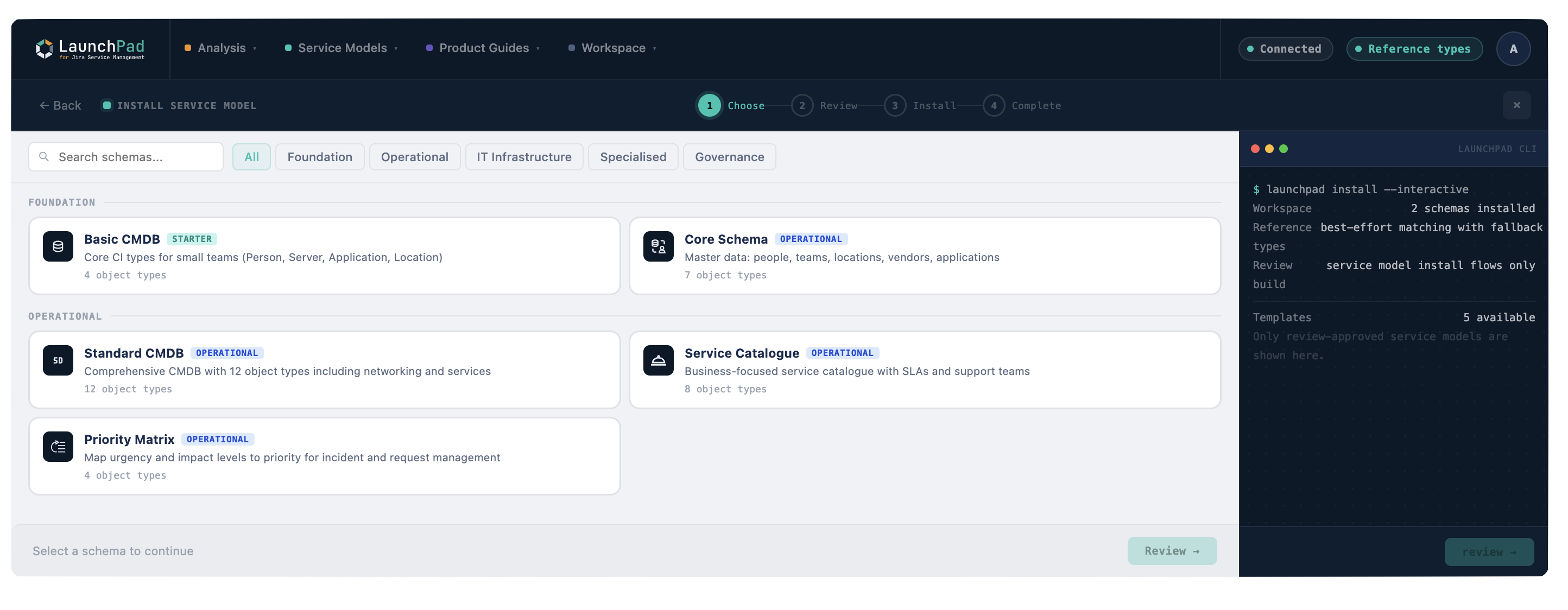
The four common starting points at a glance
| Service model | Best For | Object Types | Complexity |
|---|---|---|---|
| Basic CMDB | Teams who need asset tracking and service ownership without complexity. First-time CMDB builders. | 2 types, intentionally minimal | Starter |
| Core Schema | Teams who want the shared hub in place first. Covers people, teams, departments, vendors, cost centres, and business services. | 8 types (v1.2 adds Business Service) | Operational |
| Standard CMDB | Organisations with established ITSM processes who need infrastructure tracking, services, and full dependency mapping. | 8 types with deep relationship modelling | Operational |
| Service Catalogue | Teams focused on service delivery. Maps service offerings to supporting infrastructure and SLAs. | 6 types focused on services, offerings, and support structures | Operational |
Decision questions
Answer these three questions and the right service model becomes obvious.
1. What is the first problem you want to solve?
| If your priority is... | Start with |
|---|---|
| Knowing what assets you have and who owns them | Basic CMDB |
| Building a foundation you can extend over months | Core Schema |
| Full ITSM maturity: change, incident, problem linked to CIs | Standard CMDB |
| Defining and managing service offerings with SLAs | Service Catalogue |
2. How many people will use the service model in the first three months?
| Team size | Recommendation |
|---|---|
| 1-5 people | Basic CMDB or Core Schema. Keep it manageable. |
| 5-20 people | Core Schema or Standard CMDB. You have enough hands to maintain more data. |
| 20+ people | Standard CMDB. Multiple teams means you need clear ownership and process integration. |
3. Do you already have data in Assets?
| Current state | Recommendation |
|---|---|
| Completely empty, starting fresh | Basic CMDB. Learn the model, then expand. |
| Some objects exist but no real structure | Core Schema. It will give you a proper structure to organise existing data. |
| Existing service model that needs extending | Standard CMDB or deploy a complementary service model alongside (see Connecting Schemas Together). |
Still not sure?
Pick Basic CMDB. Seriously. The most common mistake is over-scoping on day one. Basic CMDB gives you a working system in minutes. Once you have real data and real usage patterns, you will know exactly what you need next, and LaunchPad lets you extend it in place or deploy additional service models alongside your existing one without disrupting anything.
Adding Priority Matrix alongside
Priority Matrix is a small, focused service model that sits alongside whichever starter you pick. It maps impact and urgency to priority so incidents route consistently. If your team handles a steady flow of incidents and needs a defensible priority calculation, deploy it as a second model after your starter is live. See Priority Matrix in the reference section.
The rest of the catalogue
Once a starting model is live, the remaining service models cover the specialist domains: SLA Management, Cloud-Native Infrastructure, Cybersecurity, Software Asset Management, Vendor Management, Workforce Management, Enterprise IT CMDB, and Documentation Management. All of them are installable today; browse the service model reference for what each contains.
Most of these are spokes that extend Core Schema, pulling shared master data (people, teams, vendors, cost centres) from one hub instead of duplicating it. When you deploy a spoke, each reference into Core resolves in one of three modes: link to the existing Core object, create the type locally, or keep plain text. Hub-and-spoke architecture explains the model, which is worth understanding before you pick a second service model.