SLA management
SLA management
The contract says four-hour resolution. The incident is two hours old, the assignee has gone quiet, and nobody can say who takes the next phone call. SLA Management exists so that the answer is already written down before the clock starts.
The schema gives you three focused object types covering the full commitment chain: the targets you have promised, the escalation that fires when those targets are at risk, and the services those promises attach to. From template version 1.1 the schema extends the Core Schema, so escalation rules can point at real Person and Team objects rather than names typed into a text field. Pair it with the Priority Matrix and you get end-to-end incident handling: priority classification selects the SLA policy, and the policy's targets drive escalation.
What you get
| Object Type | Purpose | Key Attributes |
|---|---|---|
| SLA Policy | Response and resolution targets per priority level | Name, Priority, Response Target, Resolution Target, Support Hours, Calendar Type, Breach Notification, Escalation Rule |
| Escalation Rule | Triggers and targets for SLA breach escalation | Name, Trigger, Escalation Person, Escalation Team, Escalation Target, Notification Method, Auto-Reassign, Escalation Level |
| Service Offering | Services linked to their governing SLA policy | Name, Service Type, SLA Policy (Governed By), Service Owner (Team), Availability Target, Customer Facing |
3 object types · 4 reference types · extends Core Schema
Pro tip: Deploy the Core Schema first. Escalation Person, Escalation Team, and Service Owner all reference Core's Person and Team object types, so escalation routing and service ownership inherit the contact details, on-call rotations, and escalation paths already maintained there.
When to use this schema
Deploy SLA Management if your organisation needs to:
-
Formalise response and resolution targets per priority level, replacing informal "we try to respond quickly" expectations
-
Define escalation rules that fire before a breach occurs, with a named person, a team, or a role string as the escalation target
-
Link every service to its governing SLA policy and its owning team, so commitments and accountability sit in one queryable place
-
Support managed service provider operations where different clients hold contractually different SLA tiers
The schema works best alongside the Priority Matrix, which supplies the priority levels that SLA policies consume. Together they cover the whole chain from incident classification to executive escalation.
Not quite right? If you only need to classify incidents by impact and urgency without SLA enforcement, deploy the Priority Matrix on its own. If you want a full service catalogue with categories, knowledge articles, and request types, the Service Catalogue includes its own service level definitions.
Schema at a glance
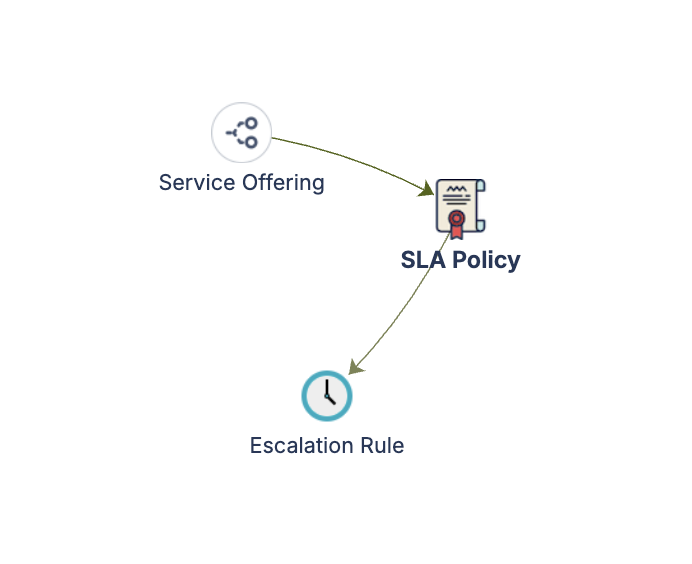
Service Offering ──(Governed By)──▶ SLA Policy ──(Escalates Via)──▶ Escalation Rule
       │                                                                  │
  (Owned By)                                                       (Escalates To)
       ▼                                                                  ▼
Core Schema: Team                                          Core Schema: Person / Team
Four reference types connect the chain. Governed By (blue) links services to policies, Escalates Via (red) links policies to escalation rules, Escalates To (red) routes an escalation rule to the Core Person or Team that gets notified, and Owned By (purple) ties each service offering to its owning Core Team.
When you deploy, LaunchPad asks how the Core Schema references should resolve: link them to your existing Core Schema, create local Person and Team types inside this schema, or fall back to plain text. The quick start guide covers the trade-offs.
Documentation
Quick Start Guide Deployment walkthrough covering SLA policy setup, escalation rule configuration, Core Schema reference resolution, service offering linkage, and starter data for all three object types.
Governance Playbook (part of LaunchPad IP) SLA review cadence, breach analysis practices, escalation tuning, and keeping targets aligned with business needs.
Forms Specification (part of LaunchPad IP) Form layouts for SLA policies, escalation rules, and service offerings.